Friday, December 14, 2012

Displaying a MOC digitally....

One thing I get a little annoyed with is the inability of transporting any models to an event. Most of my equipment that I take is photography stuff, so unless I am bringing something small, I have to place a MOC in my luggage (not a really good idea) or not bring anything at all.

Since I ran into the realization above, I started thinking about other ways of displaying a MOC. Anyone who has gone to an event knows that seeing a model online is nothing compared to seeing a model for real. This is why I tend to spend my time looking at models at displays instead of online. Like sculpture, a MOC has to be experienced from all sides. This is a challenge to those who cannot bring a MOC for various reasons, and also to the fans who cannot go to events for one reason or another. How can a person display without MOCs?

It's a bit easier now with the arrival of smartphones and iPads. Digitally built MOCs can now be displayed with LDraw readers on tablets or phones. I use BrickPad on my iPad and iPhone. I have become more interested in digital display for a few reasons:

1. There is no lack of display space.
2. You can view from any viewpoint, including minifigure point of view.
3. You can manipulate the model and examine construction - BrickPad can display construction steps, and has been updated to do more.

There's a lot of potential here. Not only can a viewer see a model, he can move it, rotate it, even deconstruct it, which cannot be done at displays. This allows full interactivity with a model to see internal workings and tour a model from a minifig point of view.


This is a render of a file I built in Bricksmith.


Another angle. You can switch angles by finger swipes in BrickPad, so you can rotate the pahser in virtual space.
This allows a flexibility that didn't exist before. With virtual models, people can touch and break apart a MOC. 

You can get BrickPad free at iTunes here. I have a couple of MOCs in the library and plan to add more. My goal is to have a digital portfolio of my better MOCs to show at events. Other builders can showcase parts that people can't usually see, like an interior of a building.

And thank Kenrick Drew for making the app!

5 Steps to a Good MOC

I am in the midst of putting together a magazine, and I asked an interviewee how their design process is. How we design is a good indicator of our building experience and knowledge, so I mentioned possibly making a how-to on MOC building and I created an example, which you see below.

Please keep in mind this is a guideline, not a end-all procedure. In fact I would like to see how others build - it's fascinating to see how others make their MOCs.

Joe's 5 Steps to MOC Building (a constantly changing process, but this is the current version)

1. Get inspired. That doesn't mean going and copying a MOC you like, but studying and looking for things that fit your interests until you run into something that you want to build. That want will be the drive to make you build your best.

2. Study and Sketch. Look up and research ideas for your MOC. Look at other MOCs that you think may fit your idea. Sketch your model, either on paper or with LEGO elements.

3. Create and Sketch. Start thinking about the how and whys of your model - why does have long wings? Does it need more than one crew? Is it a transport or fighter? Figure a purpose to your model and work on your sketch. Your choices will affect your model. Embrace that by making a backstory.

4. Build and rebuild. The first iteration of a model is rarely the final iteration. Build and constantly evaluate the model for stability and as new parts become available, new building solutions. At this point building may become a one step up, one step back as components get rebuilt sturdier.

5. Finish and detail. Add details like color and decals and built detail. Building is like writing, except that you are visually making what you are thinking - "this is my green fighter/transport." What you  build from that simple description is going to be different from mine, but that is the great thing about building - it is your expression!

So what other steps and processes are there? What do you do?

Wednesday, August 8, 2012

The Hollywood Tower


Untitled, originally uploaded by jmenomeno.

Built by John Rudy - and is the Tower before it was struck by lightning! Below is one of the red trolley cars that is now running at California Adventure.

Lothlorien


Untitled, originally uploaded by jmenomeno.

Seen at Brickfair, this was an amazingly detailed landscape.

Monday, May 28, 2012

Monorails!

For the past year, I have been working on what is now called the Monorail Project. Kinda neat name with the idea of bringing in LEGO monorails back, with a twist. Instead of bringing back the old classic monorail, the Monorail Project is about creating a new system using off-the-shelf parts.

This approach was first pioneered by Masao Hidaka in Japan, and you can see his work here:


Besides the monorail, he has designed track and switches also:

 
Very clever building here. Masao bends bricks to make curves and switches, which means that the parts needed to make the track are no more than 2-wide bricks, plates, and tiles.

For those who are monorail junkies, you might recognize Masao's model as resembling the monorails at Tokyo Disneyland. I spotted that and started thinking about building my own monorail last year based on Disney World's Mark VI monorail:

Here's video for Red and then I built Blue:
and then a Mark VII from Disneyland:
All three have head/taillights and use the same track as developed by Masao.

Meanwhile, at the same time, Steven Walker in Washington was developing his own monorail, using the airliner fuselage and a different drive system:

A Flickr video can be seen here of his monorail. His track is much the same as Masao's, but his curved track is a stiffer design. One important thing that Steven's monorail has is a rear wheel caster that allows the monorail to take curves much smoother than my original design. Since then I have revised, and what was a pretty slow monorail has become a consistent moving train.

So there is an active research effort being done with the monorail. Brickbuilt monorails have been created in New York and in Florida.  However, a monorail that was presented at BrickMagic 2012 went a completely different direction.

Nathaniel Brill of PENNLug built a suspended monorail.

Using 4.5 v track (which are separate rail parts), Nate created a track that was light and strong. From there, he built a train that hangs from the track and runs on two contact points, reducing friction. And he did this in only a couple of days.

Here's a video:


Amazing and elegant work. And this appears to only be the beginning.

Friday, May 11, 2012

Building a Robot....

So I got to do a display last weekend, but I had to build a model for this. It was Free Comic Book Day and I decided to build Atomic Robo:

His writer was going to be at this event, and this was something I wanted to try anyways..a figure.

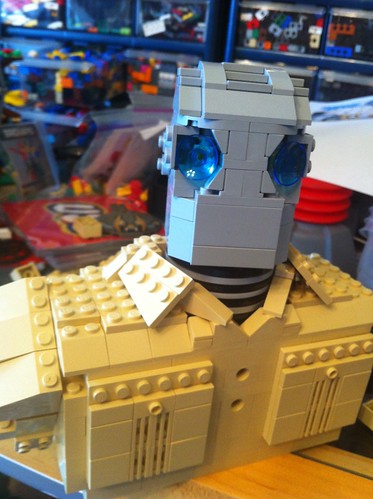
It took a couple of days of hammering at the head shape to get something - using SNOT mostly. After that, it was the neck and shoulders that were done. I followed the graphic above for the look:

Untitled 
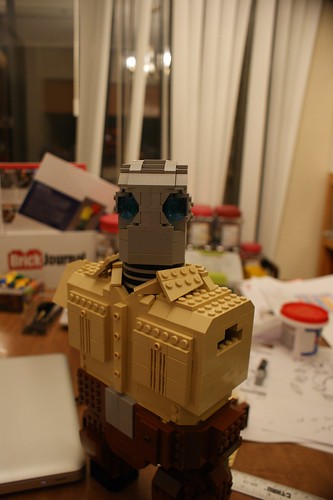
The collar was the thing I really wanted to work. After that, the pockets came into play, but those were pretty easy compared to the collar. The head originally had a round brick to slide  a flextube that held the neck in place, but I later made it so the head simply slid into the neck. Because of its looseness, the head can turn and pivot up and down slightly.

And the next week the model just sat for a week. Then it was mentioned to the organizers that this would be at the event, so Atomic Robo HAD to be finished...so...


Untitled 
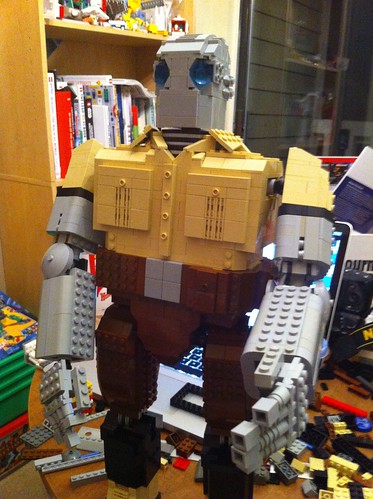
His waist was worked on, and his legs started coming into shape.

Here's where things get really tough. The hinges that LEGO has available are not meant for things like these. I had to figure out what hinges to use and how to optimize their strength. The newer large click swivels were used for the waist, elbow and shoulder joints. For the knees I used two technic click joints, and ended up with this:

Untitled 


The wrist is another click swivel, but the fingers are simple clip parts. The finger tips are bricks so I can use plates to make bent fingers if needed.

I liked him, but he looked incomplete. He needed a gun. However, having him hold a gun proved to be a real challenge - his balance standing straight is easy to manage. All the hinges are meant to stay straight - in this case straight vertical.

Take a look at this pic and I will tell you the various tricks I used to make this work:


Untitled 
1. The pose - I really didn't like the straight standing. So I had Atomic Robo stand on a raised hill. This affected the balance tremendously. The model was bent forward to make the balance work. And unseen here is that the boots only attach on a 2x4 brick. The shins protect the joints, which slide in. Yes, you can slide the him off the boots. I did that for portability.

2. The gun and arm - I originally made a big gun - a REAL big gun. But two issues came up - the weight threw the balance off. Way off. I had to cut the gun in half. I also had to secure the gun to the hand, so I rebuilt the hand and gun so the hand fit in it and the gun is attached to the inside of the elbow. The right arm is a gun/arm, and there is a lot of weight on it. So how does it stay?

3. A pistol?? - If you look under the arm, there is a pistol in holster. It's not really, but the holster is there. It turns out that if the joints were moved to a certain position, the arm would rest on the holster and be stable. Bt a solid bump would knock the arm off, and the gun would swing down and literally tear the arm off with its momentum, which would lead to complete collapse. That was solved by...

4. The OTHER arm - I wanted the other arm to hold the barrel anyways, so I built a quick attachment point in the hand to the barrel, and after some fumbling, I got them to meet and join. Both arms kept the gun in place and made for a very stable position.

5. Details - I am really proud of the grenades. Really. And the collar. And the head.

I tried to build this for travel, so the head is removable, the arms and legs are movable, and the body removes from the stand. Takes a little setup, but when done, he get a good impression:

even from Brian Clevinger, the writer of Atomic Robo!

Now to see if I can build another figure....and get the legs closer together...

Thursday, May 10, 2012

The Other Side of Making Things...

Okay, so I was on a soapbox about LEGO CUUSOO (more about the community than the site) on the previous blog post. Now I am going to another website where things seem to be a little clear-cut.

Kickstarter is a site where people can submit projects that can be funded. The threshold is determined by the project leaders, and the time limit is variable (I think). There are projects in every field, and there are a growing number of LEGO-related projects going online. Here are some projects worth note:

Little Guys...in Space! A LEGO® Fan Film from Paganomation - a film being proposed by David Pagano, a brick animator who was part of BrickJournal 14. This project is close to deadline, so if you want to support it, act soon!


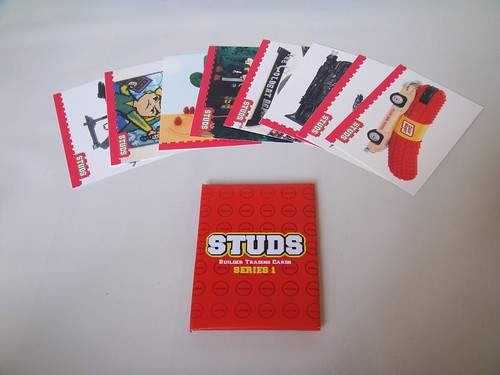
STUDS Collectible Cards - a set of trading cards proposed by Brandon Griffith, who was in BrickJournal 6. The cards are of AFOLs and community, and I was asked to be one of the cards as well as BrickJournal! I think this is a great idea, as these could be sold and and seen at events...how cool would that be?


I am a supporter of the above projects and encourage others to join. There's other projects too, so go look!

For me, the question I see here is whether or not the Kickstarter model of donating funding is a better model than the LEGO CUUSOO model of voting. There are pros and cons to either way:

LEGO CUUSOO:
Pros: 
1. Doesn't require any money.
2. Easy to vote.
3. Specifically LEGO, so a set would be an official LEGO set

Cons:
1. No guarantee of production, just review
2. No indication of practicality on a proposed set - a zillion part set isn't given any deference (when it should...any set over 1000 parts becomes a costly set, which I woudl think would make it harder to pass muster)
3. No real vestment by voters - when they say they will buy doesn't mean they will...

Kickstarter:
Pros:
1. Funders have a vested interest in success.
2. Easy to vote
3. Can be a LEGO-related item, not LEGO specific

Cons:
1. Funding may not be successful
2. Not official LEGO associated company
3. Need money to participate


So which one is better? Depends on what you want. If you want a set, LEGO CUUSOO is the only way to go, but it's tough. If you want something else, Kickstarter is a way to go that may not be as hard, depending on the funding target and the validity of the idea.


Thoughts?


Making New Things....

Been watching LEGO CUUSOO since the beginning, and I am fascinated by what has happened so far. For those who are unfamiliar with the site, it's a wish site, for lack of a better term. People submit wish sets or parts or themes to be considered for production by the LEGO Group. If 10,000 people support the idea, it wins a review round for production.

10,000 is a big number. And for a while, it looked that the number was beyond the reach of many projects. But that changed in the past month or so, with 5 projects hitting the threshold:

Shaun of the Dead
EVE Online Ships
Back to the Future
The Legend of Zelda
Firefly Serenity Set

Two have already been reviewed: Firefly Serenity and Shaun of the Dead. Both were declined production for not being appropriate for the target audience of children 6 - 11.

I am not going to go on a soapbox about why these were not selected. The LEGO Group has final say on any given project, and they can do as they choose. And honestly, what they have to do is dance a fine line. I feel a little bad for them because they have upset 10,000 people with each decline at the very least.

What I AM going to go on a soapbox on is: WHERE ARE THE AFOL projects????

I mean, really....the AFOL community likes to talk about how big and important they are, but look at the list above - how many were mobilized by the AFOL community? The LEGO Minecraft set was mobilized to 10,000 in 48 hours after Mojang posted the model on their blog and twitter and who knows what... Shaun of the Dead got tweeted by Simon Pegg, and numbers shot through the roof! Where are the AFOL projects?

The closest project that I have seen is the Modular Western Town, which is almost up there, but has been online since October. It has been posted constantly on Eurobricks and I think mentioned on Brothers Brick, but it's been going slow.

How can the community rally behind a set and push it to review? If there is an established community behind it, like a movie or game, it's not that hard. However, that would appear to mean that only licensed properties will have a chance with this environment, which is less than a positive thing.

Why? Because the creativity that AFOLs have is being passed over for the new Star Wars set or the set based on (fill in the blank). The worse thing is that we, the AFOLs, are letting that happen.

We can make excuses about how hard it is to navigate the CUUSOO page and find the things we want to support, and we can make excuses about other factors. But when it comes down to the core issue, the AFOL community appears not organized enough to push its own set or sets to review.

And I know better. We need to push a project, and as fast as any other - for one VERY important reason: We need to show the LEGO Group that we have the influence we claim we have.

LEGO CUUSOO was designed to show how strong our community is...and right now, we don't look strong at all.

Okay, I am off my soapbox.

Next blog post will be on another crowdsource site - Kickstarter!

Tuesday, May 1, 2012

Watching the Community Grow...

I started in this hobby in 2000. That makes it 12 years that I have been building, and that's a long time.

How long?

When I got in the hobby, there was only one website: LUGNET.

There was one photo site: Brickshelf.

There were only a handful of LEGO stores, and LEGO Shop at Home was just beginning.

LEGO conventions? They were just starting.

LEGO Users Group? There was one in my state (NCLUG). It was a small group in number, but the amount of stuff built was amazing.

And me? I just was starting out. My first MOC was an alternate build of the first X-Wing set (the grey one) No, I don't know the set number (and I tend to not try to remember them - it's the box I remember).

And when I posted the model online, it was greeted with positive comments from people online, and that led to me building more. I was encouraged by others from places across the country, and I built and improved my craft. At the time, that's all I thought I could do - just build.

It was my first convention, which was BrickFest 2001, that opened me up to a new universe - I met some friends that have become very close friends there, and I met many of the builders that I looked up to...and they were just like me. That was a big epiphany.

A lot has happened since. I can tell you the story, but the short of it is that I took a different route from the expected, as I realized that I wanted to do more than build. It became apparent to me that the LEGO community needed a document to record it as it grew. Coming from a publishing background, it was too obvious to me, but it took some time to fully realize what I wanted to do. What happened was BrickJournal.

That was 7 years ago.  BrickJournal went to print from online 4 years ago, in a printing environment that wasn't positive. However, the magazine has persevered and is still growing.

The community has also grown by leaps and bounds all over the world too. Events have been done in the US and Europe and Asia. And BrickJournal has been able to cover many of them, from Brickworld in Chicago to Bricking Bavaria in Germany to BrickFan Town and Brick Fan Castle in Japan. It's amazing to see this growth happen, and to be part of a growing, vibrant community.

But the most important thing that I keep sight of now, that manages my direction of the magazine, is the simple act of discovery. I want BrickJournal to discover the people of this community. I want this spirit of discovery be the inspiration to the next generation of builders, whoever they may be.

The community still grows, and I have seen the generations of AFOLs take their shot at moving the community. I saw the community expand from one website to many, and with that I felt a little sadness as fragmentation began. I also saw the community get closer to the LEGO Group thanks to efforts of the company and the best AFOLs on the planet.

Think about it. We now are able to submit our ideas to the LEGO Group on LEGO CUUSOO and have it produced, if there is enough interest. That was something completely impossible when I started. There are now other AFOL publications too, which I welcome. The community can only grow better.

We live in incredible times, and so we are left to discover what lies out there for each of us. We can make a difference. You can do the same. Explore what you can do. Inspire a new builder. Build an astonishing model. Volunteer for an event.

I know that because I started as a builder, but decided to see what was out there and I did all those things. And now I am going back to my roots, back to NCLUG, back to building. I was hit by inspiration again. There's so much more to do...


So here's to another twelve years in the hobby at least.

And even more exciting things happening.

An Event Coordinator's Lament

It's been a while since I have posted here, and there are a variety of reasons why...working on another issue of BrickJournal, off on a trip to an event, or in this case, up  to planning an event.

BrickMagic is an event that I run in May - it's a modest-sized convention, and it attracts people from as far north as Pennsylvania, as far south as Florida, and as far west as Texas. That's pretty cool - and what I really enjoy about the event is that many of the attendees are people that I have known in the hobby for several years. A lot of the event is making a great party for my friends.

But there are always the challenges that are posed every year. In many ways, setting up an event with a 150 people and a group of volunteers is like a military operation - there has to be advanced planning, mobilizing, then the actual campaign. Most of these aspects are easily managed - budget is the most onerous one, but after that, there's logistics.

One would think that setting up a floor plan would be easy for an event, but it really isn't. While it appears that the effort done is simply moving tables and stantions, there is some thought that has to go into this. It's not easy, and the toughest variable is literally the unknown.

Let me explain this - every year, people signup and pay for their registrations and get ready to go an event. However, there is one thing that isn't always noted: the registrant's MOCs.

There are many reasons why a MOC may not be registered, such as not being finished, or too busy, or maybe not deciding until the last minute. The validity of these arguments is pretty much a relative thing to me, but ultimately, this is a challenge for me and other event coordinators.

Why is this such a challenge? Using the military operation metaphor, it's hard to figure out an operation if you don't know your troops. What that really means is that it's hard to plan out table space for MOCs if we don't know completely what is coming in. And the margin of MOCs that are registered as opposed to the "surprise MOCs" is a pretty high margin.

For any event coordinator, mapping out the tables is one of the most important things at an event. A good layout showcases everyone and allows viewers to easily go from one place to another...while this is easy to manage at the attendee part of an event, the public part is much more difficult, as the traffic goes significantly higher.

Tables and layouts have to be set up with stantions, which means that a footprint for the layout will be bigger than the layout itself,  then walkspace has to be added. Here's some rules of thumb: There is usually a 3 foot gap from a table to a stantion (although it can be reduced to 2 feet) and walkspace is usually 10 feet to allow for people to "clump up" and look as well as let people pass. For larger events, this is pushed larger.

This isn't that big of a deal until a lot of smaller displays end up being separate displays - the space between them requires both the stantion buffer and walkspace between  them. This is one of the reasons why there are themed areas, so tables can be lined up together. One large group only has one set of buffers and walkway so it's more efficient.

It's very important that MOCs be listed to allow for better planning. Many of the attendees at BrickMagic have already told me their layout sizes and table requests, and that's what I want to know. I have a floor plan for these people already in mind, but I have to also try to figure out who else will be coming and bringing things.

I don't expect everyone to tell me exactly what they are bringing - there are always new models that come and things just happen, for lack of a better term. However, it must be understood that while it is relatively easy to add one model to a table, or two, or even three, when a table has to be added that wasn't on the floor plan before, that can be pretty disruptive. And honestly, dozens of MOCs come in that are not listed.

So if you really want to help an event out, do it a favor - register, and register your MOCs. You'll give a good impression to the event staff, and you'll be helping in planning. If you have a large display, the sooner you inform the event, the better. Keep in mind that all these events are for you to show off, so we are doing our best for you. Any help you give will only make the events better.

And from all of us coordinators...thanks in advance!

Tuesday, August 30, 2011

LEGO Contest!

LEGO is asking consumers ages 6 + to design a LEGO themed postage stamp to be featured on the Late Holiday Catalogue .

For each country there will be 50 finalists selected to receive a copy of 10222. 25 will be for ages 6-14 and 25 will be from ages 15 & up. From the 50 finalists, 1 grand prize winner will be selected per country. In addition to a copy of 10222 – Winter Village Post Office, grand prize winners will have their stamp design featured on the late holiday catalog for their country along with a professionally designed and framed LEGO mosaic of their design.

Where: The US/UK/Germany. These are the only countries that mail a late holiday catalogue
When: We will be accepting entries for the contest September 1-30 and selecting the finalists & winners for each country the first week of October.
How: Consumers must simply visit shop.LEGO.com/Design-Challenge (Germany: shop.LEGO.com/Designwettbewerb) to download the official entry form. They or their parent/guardian must complete the form and email it along with their stamp design to the email address designated for their country. No purchase is required and there will be no physical entries collected.


- Posted using BlogPress from my iPad

Thursday, April 7, 2011

It's all in the details!


2, originally uploaded by Nebraska's MOC.

Take a look at this complete diorama, with lighting by Lifelites (Rob Hendrix). Beautiful use of lighting and building technique. The rest of this gallery shows off more of the model!

Monday, April 4, 2011

Building Thoughts: Bricks of Character

One of the things that I get to do as a sorta-journalist is watch and find out about building trends in the community. While there are constant themes, trains and space come to mind right off the bat, there are those builders that don't fit the general themes. This is a good thing overall, as no builder should be pigeonholed in a theme, unless they want to be. I started as a space builder, then wandered to micro scale, then to MINDSTORMS, and now just a LEGO builder.

Anyways, a relatively new trend is Bricks of Character. started by Iain Heath and Tommy Williamson, this is a theme that is not based on a genre or theme, like Space or Train, but based on building characters. It's a little tough to explain in words, so here are some pics:


Jack Sparrow, built by Erik Varszegi, LEGO Master Builder.


Ponyo, built by Iain Heath


Marvel CubeDudes(tm), built by Angus MacLane


Jack Sparrow and Barbossa, built by Tommy Williamson

Each one of these are wildly different building styles, from realistic life size to almost miniland scale to caricatured scale, but each has a common thread - they are all character builds.

The first display of Bricks of Character was at BrickCon 2009, and in a couple of years has grown to a major display at the event. Part of the reason behind this is that the theme allows a wide assortment of models. The models above could show up at the display, but so could miniland models of TV characters and cartoon icons. Video game figures have also appeared.

The other factor behind the popularity of the theme is that a model often doesn't have to be that big to display, making it a perfect thing to take to a convention. A miniland model can easily fit in a bag and be assembled on site in a short time.

So how do you build something like this?


Tinkerbell, by Janey Cook


Well, here are some general steps, which may be helpful.

1. Determine your scale and color. This is the most important part of the building, because it's REALLY annoying when the part you need is not in the right color at all. Scale is good to figure out the resulting size.

2. Sketch what you want to build first on blank paper, then on graph paper. The best models are not simple standing poses, except for CubeDudes. A character is partially defined by the pose, as shown in Jack and Ponyo and Tink and the pirates above.

Using graph paper is good to transfer and start figuring out building techniques. LEGO-scaled graph paper can be found here.

Things to think about while sketching: the pose of the figure and how curvy you will need to build. Curves will define much of your building challenges, so decide beforehand how will work with or without curves.

3. Build and explore. The larger the scale, the more likely the building solution will be easy to find. However, that will mean more parts will be needed. The smaller scale will also make you think of different building techniques - it's a good way to learn Studs Not on Top building.

Because this is usually exploring, the expectation of building it right on the first try should be low. One technique may have to make way for another, and colors may have to be changed for parts availability. Patience is a nice thing to have:-).


I built Black Canary over the span of a couple of nights - I had to learn how to build a stable pose for her. Once I figured out her legs, it wasn't any easier figuring her hair, which could stand another revision.


A note here: if your want to really make it complicated, incorporate curves! Put another way, the female form is probably the hardest to build in LEGO elements. Be extra patient.

If you want to look at some galleries with Bricks of Character, you can look at:

Tommy Williamson's Flickr gallery
Iain Heath's gallery
My galleries: look in BrickCon 2009 and 2008
Angus MacLane's gallery

Take a look at their work, and see what you can do. I look forward to seeing your work online or at an event!

- Posted using BlogPress from my iPad

Thursday, March 10, 2011

How Specific do you Sort?

In the LEGO library, there are thousands of parts that are created for all the sets, from mini figure accessories to simple bricks. When keeping a small collection, there are only a limited number of parts to sort, but as the collection grows, so does the assortment. This inevitably leads to sorting challenges.

For most of us, we don't have the space to make room for every individual part, so we combine in some way. I combine my parts in two different ways:

COLOR


With my plates, I combine colors that are distinct together - the size is easy to recognize, and color is even easier. Here, I start with 1x2 plates and go to 2 x 8 plates at the end. Larger plates are in bins under my work surface. The bottom row has my exotic colors - the ones that I probably will not use. When I need large plates or run out of a color in a drawer, I have a couple of overflow bins to search.

The bottom left drawer has all my small rounded slopes. I don't have these sorted by color either. I am not that organized:-)! I do have my 2 x bricks separated by color in bins, though.

For specialty parts, though, I use a slightly different strategy.


I group similar parts together. These are parts that have the clip handles in some way or form. The only exception is that control brick element in the foreground, which needs to be somewhere else! All the other parts are there for two reasons:

1. They are easier to find in a group than separately. This is especially applicable when I only have a few parts.

2. Grouping encourages my creativity by letting me see more than one option to a part.


Here's another example. Headlight bricks and SNOT bricks in the same drawer. The different options from sunk-in stud to studs on more than one side, give me a variety of ways to mount parts by the side, and in some cases, more than one side.

This system seems to work for me most of the time, although I am in the process of migrating the most used parts to the drawers to build more efficiently. Developing your own sorting setup and system will take a little time, as you have to see what parts you use the most to determine what goes where. Also, if you are a more precise builder, you'll probably want more specific bins and drawers. Keep in mind that this will expand your work area, though. A former AFOL I knew had an entire basement set aside for building, and his walls were lined with drawers of parts.

So how do you sort?


- Posted using BlogPress from my iPad

Sunday, March 6, 2011

Going a New Direction...

The blog has been quiet for a while, and it's been bothering me. I take care of a website, a magazine, and this blog, not to mention my Facebook account. My primary focus is the mag, then website, then here...which means that the blog is often forgotten in the din.

It doesn't help that I place news on the website...that usually leaves very little here. Until I started getting requests and questions about building and other aspects of the hobby. It was these notes and a academic paper about the AFOL community that I read that made me realize that while blogs show cool MOCs and photos, there is almost no explanation as to the building methods.

As a result, I decided to make this blog a place to show building methods and how to do things with LEGO elements. Any person can become an expert builder with practice and understanding of this medium. I hope to start showing and maybe teaching here for those who are curious about how it's done.

But first, a disclaimer: any ideas and thoughts here concerning building and things associated with it are NOT definitive. You, as the reader, are allowed and encouraged to use these thoughts as guidelines to help your building. There is no right way to build, but there is YOUR way. Make that way the best for YOU.

Okay, so here goes the first subject:

SORTING...


Yeah, this is part of my workspace. I showed a pic of a model, and some people were impressed more with the wall in the background. It looks nice, but it needs to be changed.

Workspace sorting is a necessary evil in building. The big trick is to figure out how precise you want to be. Other factors play a part in this too, such as what themes you build in. I have seen workshops that had a million parts placed in drawers that were sorted by color and unique parts. In Billund, they have drawers that have compartments for every part, and they take up walls of space. In other places in the LEGO Group, there are walls of bins with parts. Each place has an overall plan to their organization so builders can find and get what they want easily.

For a beginning builder, the first question to answer is: What do you want to build? Building castles is different from building spaceships, so what you keep at close hand will be different. Here's some general examples of parts and colors used by different themes:

Space: greys, plates, 1 stud width bricks, specialty pieces
Town: primary colors, tan, grey, bricks 1 and 2 wide, chairs, doors, windows
Castle: greys, castle walls, bricks,
Micro: specialty parts, plates

Your theme specialty will determine what needs to be in the priority areas of your workspace. After all, you don't want to waste time looking for a part. My original plan was meant for making spaceships, so plates and detail parts were front and center. But my collection outgrew what I started with...


This is what has become of my 1 x 2 plates. Not useful for quick building, so I gotta fix this....

SHELVES


Shelves are the easiest way to organize. The wall behind my work area has these, and you can get them at Wal-Mart or Home Depot for under $20.

The more drawers you have, the more precise you can be. This can be very helpful - if you take a look at the shelf above, you'll see that I go from smallest to largest plates : 1 x 2, 2 x 3, 2 x 4, 2 x 6, 2 x 8. Larger plates are at the bottom drawer. You'll also notice that I place more than one color in each drawer. I'd do that to minimize drawers, or else I would have many more shelves!

Now, remember that drawer of 1 x 2 plates? You can make things much easier and faster by putting them in drawers, like so:


The most important thing in building is knowing where your parts are, and a shelf is a good start!

As you buy more parts, you're going to max out the drawers though. One thing I did was keep some Bionicle containers for storage:


That way, I can see the parts, the containers stack, and I can get the parts out relatively quickly.

Next size up is a shoebox:


I have a shelf for these beside my workspace. And after that, I have double shoeboxes, mostly for bricks :


The problem I have now is that the parts I use often are not in the shelf, but in the shoeboxes. I need to make room in the shelves I have for those parts.

I also have some plastic containers for some specialty parts. Keep in mind that you want your most used parts close and in front of you.

Questions? Comments? Builders are encouraged to talk about their organization for their elements. Everyone has a different style of building and sorting, so take note!

I'll answer these questions, but also send me questions about building. I will post the answers here. Hope to hear from y'all soon!


- Posted using BlogPress from my iPad

Monday, January 10, 2011

Have a contest for y'all...


I got a set of 3 Smallworks iPhone cases (transparent, black, and white) to give away, so I am doing a sorta quick building contest. What do you need to build? A phone. Or rather, what you think a phone will become in a decade. You can use real bricks, or LEGO DIgital Designer, or LDraw - this is open! Send photos of what you think a phone will become to (admin at brickjournal dot com) by January 31, 2011 and the best three will get a random Smallworks case...and if they are good enough, I'll publish them in BrickJournal. If you haven't an iPhone, I do have some other prizes that I have on hand. I'll announce those later. Questions? Drop me a line at the address above. If not - have fun and good luck!!

Notes from all around...

LEGOLAND Florida $99 Preview Annual Pass Offer Extended
from LEGOLAND Florida Marketing  

Polk County, FL (January 5, 2011) -- Due to popular demand, LEGOLAND® Florida has extended its discount on general admission tickets and Standard Annual Passes through April 2011.  Central Florida’s newest full-day, family theme park, scheduled to open in October 2011, announced the extension after a hugely successful December sales period.  Formerly expected to end on December 31, 2010 – guests will now be able to get the special rate through April 30, 2011.

Available only at www.LEGOLAND.com, general admission tickets are $65 for adults and $55 for children and seniors.  Standard Annual Passes are offered at the children’s prices of $99 with no Blackout Dates!  Plus Annual Passes and Ambassador lifetime passes are also available at the non-discounted rates of $159/$129 and $2,500 respectively.  These passes includes unlimited admission, discounts on preferred parking, special events, plus discounts on food and merchandise. (Prices do not include sales tax.)

Star Wars Invades LEGOLAND California
from LEGOLAND California

CARLSBAD, Calif. (Jan. 6, 2011) – In March 2011, LEGOLAND® California is introducing an all-new, dedicated STAR WARS Miniland area for the very first time! Guests can enjoy seven of the most famous scenes from the six live-action STAR WARS movies, as well as a scene from the animated series STAR WARS: THE CLONE WARS™  all made out of 1.5 million LEGO® bricks built in 1:20 scale. Guests will be further immersed into the STAR WARS experience as they pose with life-size LEGO models of Chewbacca, R2-D2 and Darth Vader.


Master Model Builders Stephan Bentivoglio (right) and Martin Albert (left) from LEGOLAND® Germany building the prototype of a LEGO® Millenium Falcon for LEGOLAND California’s new Miniland STAR WARS area. Photo courtesy of LEGOLAND California Resort.

Following a chronological path through the STAR WARS timeline, LEGOLAND guests retrace the major events of the beloved Saga. Some of the 2,000 LEGO models will be more than 6-feet-tall. Interactive buttons will allow children to activate animations throughout the scenes. “Our guests have really enjoyed our LEGO STAR WARS Days over the years and we’re certain this new area is going to ignite the imaginations of adults and children alike,” said General Manager of LEGOLAND California, Peter Ronchetti. “We are opening this STAR WARS Miniland display just in time for spring break.”
 

Thursday, December 23, 2010

LifeLites Tricked Out Sleigh Contest


 Santa needs your help! It seems his sleigh is in the shop just in time for Christmas and he needs you to build him one pronto! So, build your best, wackiest, most tricked out, sci-fi, or anything else kind of sleigh that you can think of and post it to the LifeLites Tricked Out Sleigh Flickr Group and you might win Santa's approval (and a prize)!
You are allowed to use some non-LEGO parts in your mostly LEGO built sleigh.

Prizes will be given away to the best sleigh for the following categories:
Wackiest - The one that makes Santa laugh the hardest!
Most realistic - Let's face it, Santa's sleigh *IS* real!
Most tricked out - Pimp my sleigh!
Crowd Pleaser - Flickr commenters unite!

Rules:
Entries must be posted to the Flickr Group by 12-31-2010 11:59PM GST.
You may only enter something that you have built and it must have not been built prior to this contest.
You may enter as many times as you wish.
Sleigh must be minifig scale.

Prizes will be kits from LifeLites with a Christmas twist. Good Luck!
Winners will be picked after the close of the contest and will be notified via Flickr mail.

Good luck!

Note: To enter, you need to load your photo in the LifeLites Tricked Out Sleigh Flickr Group. To do that, you need to join the group here.

Thanks to Rob Hendrix for sponsoring this contest!

Thursday, October 21, 2010

LEGOLAND Florida Hard Hat Tour

Today, LEGOLAND Florida is hosting a hard hat tour right now, and BrickJournal has two reporters, Todd Thuma and Robin Werner, onsite. They will be sending a report in the next day, but in the meantime, here are some photos being sent from the tour so far:

The venue for the beginning presentation in Winter Haven, Florida. The presentation began at 10 am, and set up looked a little like this:

Outside the theater

Inside the theater, with models built from the LEGOLAND California Model Shop.

 LEGOLAND Florida General Manager Adrian Jones presenting.

Admission for the park will be $65 adult/ $55 child

The presentation showed artist's conceptions of the various lands being built at the park:


We'll start at, well, the Beginning:
This is the entrance and will have a shop and restaurant.

The next section is 


Next is

and


then

followed by


continuing to

then

and

and finally

Those attending got a miniland figure:


 Press release will be at BrickJournal.com!